
The short version
- A wallet doesn’t hold coins. It holds the keys that move them, and the seed phrase is the master copy of those keys.
- Hot wallets (apps) are handy for small amounts. Cold wallets (hardware devices) are for savings.
- Write the seed phrase on paper or metal, never in a photo, a note app, a cloud drive or a chat.
- Nobody, ever, needs your seed phrase. Anyone asking is a thief.
The scariest moment in crypto isn’t a red candle. It’s opening your wallet and seeing a zero where your savings used to be. Almost every time, that comes down to how the wallet was set up or how the seed phrase was stored.
The good news: a safe setup takes about 30 minutes and you only do it once. This guide shows you how.
What a wallet actually is
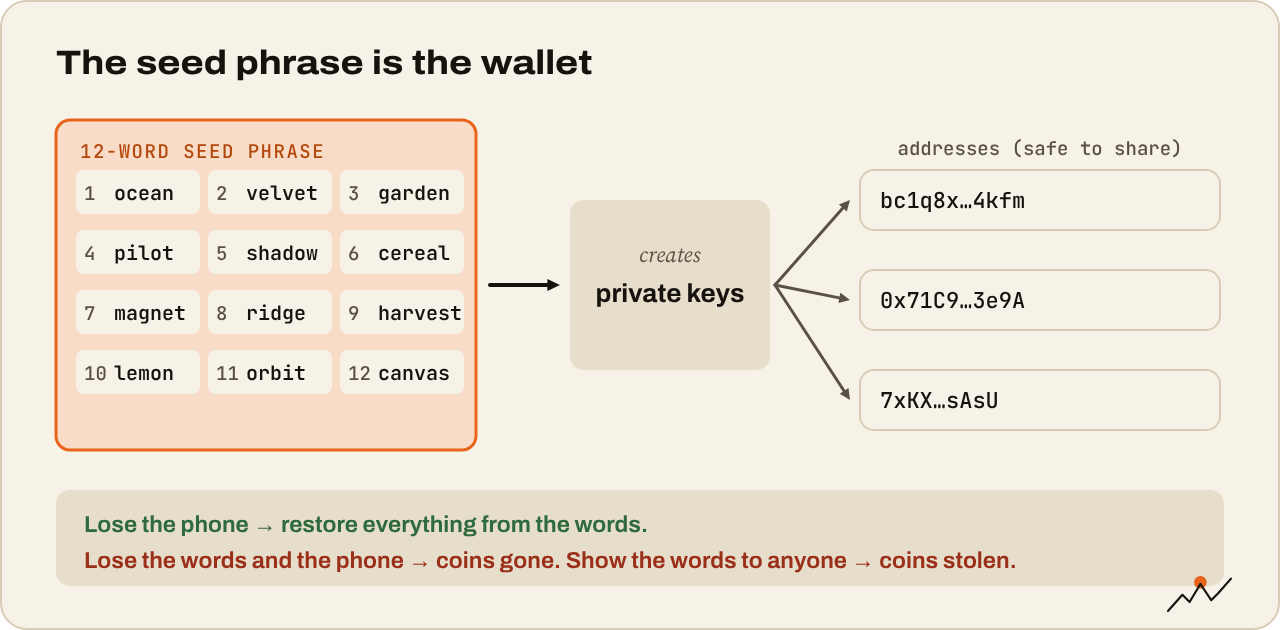
Your coins never leave the blockchain. What a wallet holds is your private key, the secret that proves you own the coins at an address and lets you sign transactions. The address is safe to share, like an account number. The key is not, ever.
When you create a wallet, it gives you a seed phrase (also called a recovery phrase): 12 or 24 ordinary words in a set order. Those words can rebuild every key in the wallet, on any compatible app or device, anywhere in the world.
In other words, the seed phrase is the wallet. Lose the phone and you can restore everything from the words. Lose the words and the phone, and the coins are gone for good. Let someone else see the words, and they can take everything without touching your phone.
Custodial vs self-custody
There are two ways to hold crypto:
- Custodial: a company (usually your exchange) holds the keys for you. You log in with a password. Easy, and you can reset a forgotten password, but you depend on that company staying honest and solvent.
- Self-custody: you hold the keys yourself. Nobody can freeze your coins or lose them for you, but there’s no reset button either.
Most people end up using both: an exchange for trading, and their own wallet for anything they hold long term.
Hot wallets vs cold wallets
| Hot wallet | Cold wallet | |
|---|---|---|
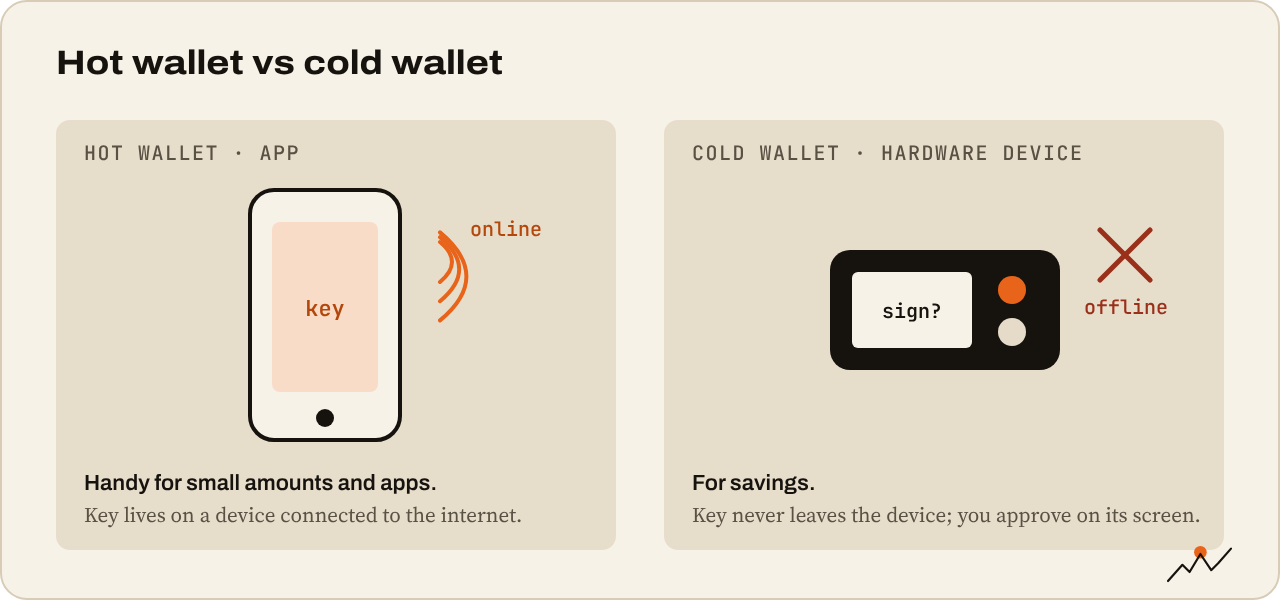
| What it is | An app on your phone, computer or browser | A small hardware device that keeps keys offline |
| Examples | MetaMask, Phantom, Rabby, Trust Wallet, BlueWallet | Ledger, Trezor, Coldcard, BitBox |
| Cost | Free | Around $60 to $250 |
| Best for | Small amounts, daily use, DeFi apps | Savings and long-term holdings |
| Main risk | Malware, phishing, signing a bad transaction | Losing the seed phrase, buying a tampered device |
A hot wallet keeps your key on a device that’s online, which makes it convenient and exposed. A cold wallet (or hardware wallet) keeps the key on a separate device that never shares it. Even if your computer is infected, the device shows each transaction on its own screen and only signs when you press its buttons.
A simple rule many people use: if losing it would hurt, it belongs on a hardware wallet.
Setting up a hot wallet
- Download from the official source only. Go to the wallet’s real website by typing the address, or use the official app store and check the developer name. Fake wallet apps and sponsored search ads that lead to copycat sites are common.
- Create a new wallet and set a strong app password or PIN. This only protects the app on this one device.
- Write down the seed phrase on paper, in order, as the app shows it. Double-check the spelling.
- Confirm the phrase when the app asks you to.
- Send a small test amount in, then practice sending it back out.
Setting up a hardware wallet
- Buy straight from the maker’s website, never from a marketplace reseller or second-hand.
- Check the box is sealed, and know that a real device never arrives with a seed phrase already printed or a scratch card with words on it. If it does, it’s tampered with. Return it.
- Install the maker’s official app and update the device firmware.
- Generate a new seed phrase on the device itself and write it down from the device’s screen.
- Set a PIN on the device.
- Do a recovery test: many devices let you check your written phrase against the device. Do it before you load real money.
Tip. Want to understand what those words really are? Ledger’s How Does Your Seed Phrase Work? explains it in 17 minutes.
Storing your seed phrase
This is the part that matters most, so slow down.
Do:
- Write it on paper, or stamp it on a metal plate (metal survives fire and water).
- Keep it somewhere private and safe at home, or split across two safe places you control.
- Number the words and write clearly. A smudged “b” that reads as “d” can lock you out.
- Think about who would need it if something happened to you, and how they would find it.
Don’t:
- Take a photo or screenshot of it.
- Type it into a notes app, email, password manager you share, cloud drive or chat.
- Type it into any website, ever. A real wallet only asks for it when you restore on your own device.
- Tell anyone you own a lot of crypto. The fewer people who know, the safer you are.
Watch out. Every “support agent,” “wallet validation” page or airdrop claim that asks for your seed phrase is a scam. Wallet makers and exchanges will never ask for it. Not by email, not on X, not in Telegram, not by phone.
Mistakes that empty wallets
- Storing the phrase digitally. Photos sync to the cloud, and cloud accounts get hacked.
- Signing something you don’t understand. A drainer site can get you to approve a transaction that hands over your tokens, without ever seeing your seed. If a site asks you to “sign” to claim a free airdrop, close it.
- Old token approvals. Apps you used months ago may still be allowed to spend your tokens. You can revoke them with tools like revoke.cash.
- Keeping everything in one hot wallet. Many people use one “spending” wallet for apps and keep savings in a separate one that never connects to anything.
Your setup checklist
- I downloaded the wallet (or bought the device) from the official source
- I wrote the seed phrase on paper or metal, in order, spelled correctly
- The phrase isn’t stored in any photo, file, cloud or chat
- I sent a small test amount in and out successfully
- Long-term savings sit on a hardware wallet, daily use in a separate hot wallet
- Someone I trust knows how to find my recovery plan if I can’t
Where to go next
Your coins have a safe home. Now let’s keep scammers away from it. The Stay safe series starts with The 10 most common crypto scams.

On the climb since 2017. Trades futures and reads onchain data. Automates the boring parts.
More from VikingXBT →