
The short version
- A chart is a record of every trade: price on the side, time along the bottom.
- The timeframe sets how much time each bar covers. Higher timeframes show the big picture; lower ones show noise.
- Volume tells you how much was traded. A move on big volume means more than one on thin volume.
- Use a log scale for long-term charts, or Bitcoin’s early years look like a flat line.
Open any crypto app and the first thing you see is a chart: a jagged line or a wall of red and green bars. Most people glance at it, see “up” or “down,” and move on.
That’s fine for checking your balance. But a chart is the market’s diary. It shows where people bought, where they sold and how much they cared. Learning to read it is the first step from guessing to understanding, and it’s easier than it looks.
The two axes
Every price chart has the same skeleton:
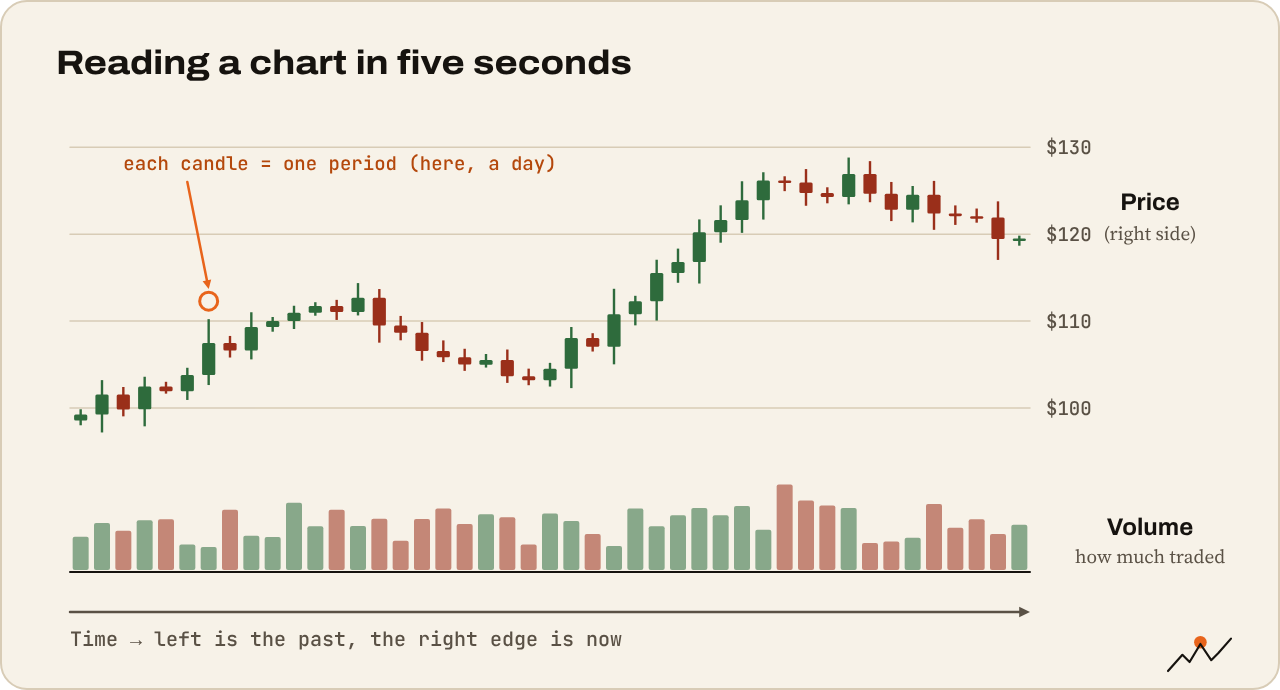
- The vertical axis (right side) is price.
- The horizontal axis (bottom) is time.
Each point or bar shows what the price was at a given time. Move left and you go back in time; the right edge is now. That’s it. Everything else on a chart is built on those two lines.
What price are you looking at?
A chart always shows one trading pair: one asset priced in another. BTC/USD is Bitcoin priced in US dollars. BTC/USDT is Bitcoin priced in the Tether stablecoin. ETH/BTC is Ethereum priced in Bitcoin, which tells you whether ETH is gaining or losing against BTC rather than against the dollar.
Each exchange has its own market, so prices differ a little between them. A chart labeled BINANCE:BTCUSDT shows trades on Binance only. Sites like CoinGecko and CoinMarketCap show an average across many exchanges. For everyday use, the difference is tiny. During a crash, it can briefly be large.
Line charts vs candlestick charts
The simplest chart is a line chart: one dot per period (usually the closing price), joined up. Good for seeing the overall trend at a glance.
Traders mostly use candlestick charts. Each candle packs four prices into one bar: where the period opened, the highest and lowest prices reached, and where it closed. Green (or hollow) means price closed higher than it opened; red means lower. You’ll learn to read them properly in the next guide.
Timeframes: zooming in and out
The timeframe is how much time each candle or point covers. Common ones:
| Timeframe | Each candle covers | Typical use |
|---|---|---|
| 1m, 5m, 15m | Minutes | Very short-term trading; mostly noise for beginners |
| 1h, 4h | Hours | Swing trades lasting days |
| 1D (daily) | One day | The main trend, key levels |
| 1W (weekly) | One week | The big picture, market cycles |
| 1M (monthly) | One month | Multi-year context |
Here’s the important part: the same market can look completely different on two timeframes. Bitcoin can be falling for six hours on the 1h chart while still in a strong uptrend on the weekly. Neither chart is wrong. They answer different questions.
As a beginner, start on the daily and weekly charts. They filter out noise and show you what really matters. A big red 5-minute candle is often forgotten by lunch.
Tip. CryptoCred’s Time Frames goes deep on how timeframes fit together. Save it for once you’ve finished this series.
Crypto never closes, so a “daily” candle needs a start time. Most exchanges and TradingView use midnight UTC (00:00). That’s why you’ll hear traders talk about the “daily close.”
Volume: how much was traded
Below most charts you’ll see a row of small bars. That’s volume: how much of the asset changed hands in each period. Usually the bar is green if the candle above closed up and red if it closed down.
Volume shows how much conviction is behind a move:
- Price rises on rising volume: lots of people are buying. The move has fuel.
- Price rises on falling volume: fewer people are joining in. The move may be tiring.
- A huge volume spike often marks a turning point or a panic: a big crash, a breakout, a news event.
Weekends are a good example. Volume usually drops on Saturday and Sunday, so price can drift on very little trading and snap back on Monday.
Linear vs log scale
The price axis can be shown two ways:
- Linear: every step is the same dollar amount. A move from $10,000 to $20,000 takes the same space as $100,000 to $110,000.
- Logarithmic (log): every step is the same percentage. A move from $10,000 to $20,000 (+100%) takes the same space as $50,000 to $100,000 (+100%).
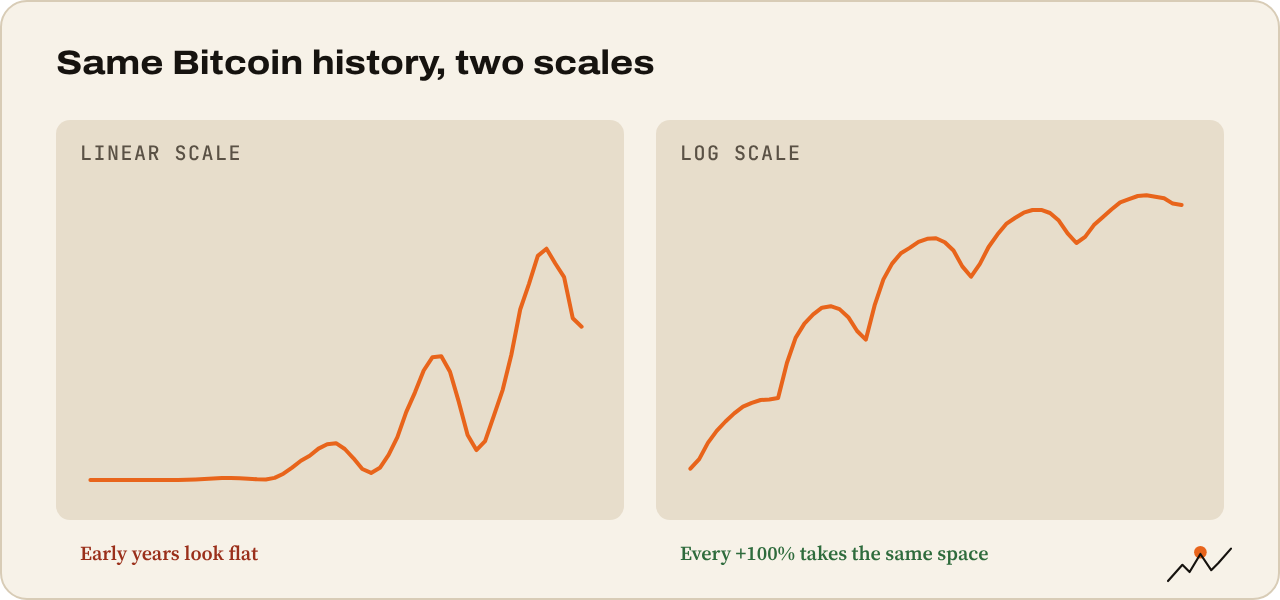
For short periods, it barely matters. For long-term charts, use log. On a linear chart, Bitcoin going from $1 to $1,000 (a 100,000% gain) looks like a flat line, because $1,000 is tiny next to $100,000. On a log chart you see what actually happened. TradingView has a “log” button in the bottom right corner.
Where to look at charts
- TradingView: free, works in any browser and on iPad, the standard for most traders. Search a pair, pick a timeframe, done.
- Your exchange: most have TradingView built in on the trading screen.
- CoinGecko or CoinMarketCap: simple line charts plus market cap and supply data.
Try it yourself
Open the BTC/USD chart on TradingView and do this:
- Switch to the weekly timeframe and turn on log scale. Find the big rallies and crashes.
- Switch to daily. Is price higher or lower than three months ago?
- Look at the volume bars. Find the biggest one in the last year. What happened that day?
- Switch to 15 minutes. Notice how much noisier it looks.
Where to go next
You know what a chart is. Next, learn what each candle is telling you: How to read a candlestick chart.

On the climb since 2017. Trades futures and reads onchain data. Automates the boring parts.
More from VikingXBT →