The short version
- DarkSword iOS exploit, a hacking kit for iPhones on iOS 18.4 to 18.7, is back in focus after an X user said his Exodus and Phantom wallets were drained on a phone running iOS 18.6.2.
- Google, Lookout and iVerify documented it in March: six bugs, three of them zero-days, and a payload that collects wallet data, Notes and hidden photos from Coinbase, Phantom, Exodus and other app users.
- Apple fixed it in stages, the last bug in iOS 26.3 in February; iOS 18.7.7 and newer also block it, and the newest updates (iOS 27.2.1, 26.7.3, 18.7.12) came out on November 9.
- Check Settings, then General, then About: if your iPhone shows iOS 18.4 to 18.7.6, update now, and keep your seed phrase off the phone.
Seed phrases on paper. Wallets drained anyway. That is the story one X user told on Monday, and it has put the DarkSword iOS exploit, a hacking kit for iPhones that targets crypto wallet apps, back in front of crypto traders.
The user, who says he used to work at Apple, woke up on Sunday, November 8, to transaction alerts: his Exodus and Phantom wallets were being drained. His recovery phrases were stored physically, so his best guess was the phone itself:

Yesterday was brutal. Both my Exodus and Phantom wallets got drained.
woke up to transaction notifications on my phone.
All my seed phrases were stored physically, soo I have no idea how they got access. My best guess is that my iPhone was compromised…
Asked which iOS version he ran, he answered 18.6.2. He also said he dislikes updates because they slow the phone down. Binance co-founder CZ replied that he needed to keep iOS up to date, quoting the DarkSword warning for iOS 18.4 to 18.7, then shared the thread with his followers:

This thread was a bit painful to read. I know the pain. Read it if you want to avoid it.
Nobody has proven DarkSword emptied those wallets. But the version fits, the wallet apps fit, and the fix has been out for months. So what is this exploit, and is your phone exposed?
What Is the DarkSword iOS Exploit?
DarkSword is an exploit chain for iPhones on iOS 18.4 to 18.7: one visit to a booby-trapped website can hand an attacker the whole phone.
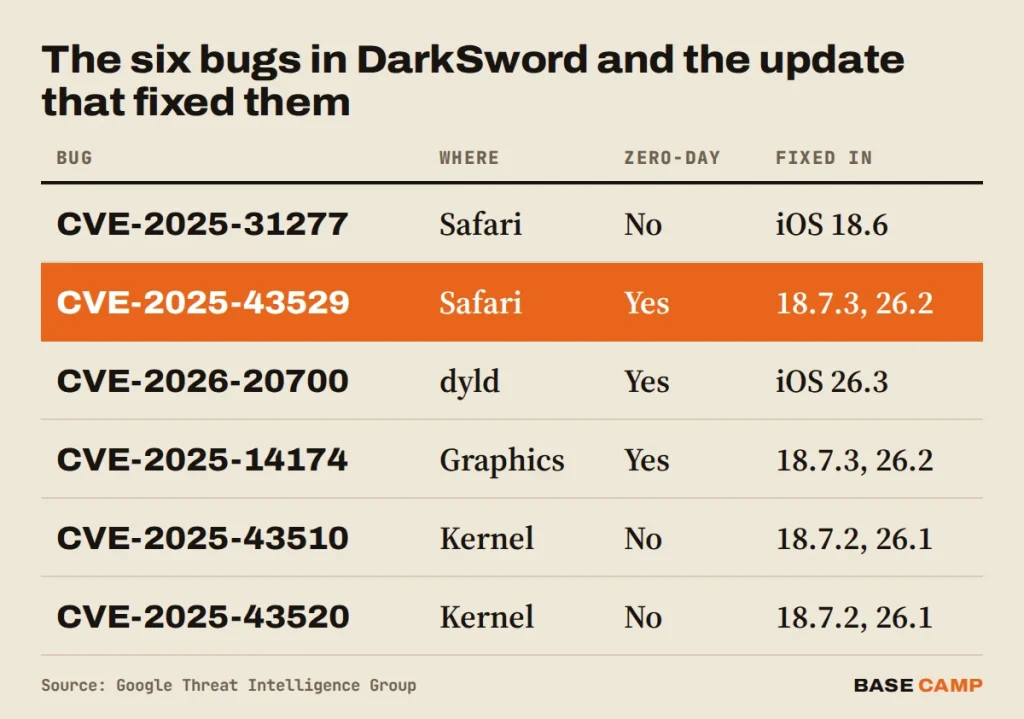
Google’s threat team published the details on March 18, together with Lookout and iVerify. The chain strings six bugs together, three of them zero-days when first used, starting in Safari’s JavaScript engine and ending with full control of the iOS kernel. Google saw it in campaigns from November 2025 in Saudi Arabia, Turkey, Malaysia and Ukraine, run by spyware vendors and suspected state-backed groups.
One of its payloads, GHOSTBLADE, is the part crypto users should care about. Google lists what it collects: device keychains, Notes, hidden photos, screenshots, iCloud Drive files, messages and “cryptocurrency wallet data”. Lookout’s write-up names the apps: exchanges such as Coinbase, Binance, Kraken and OKX, and wallets including Ledger, Trezor, MetaMask, Exodus, Phantom, Uniswap and Gnosis Safe.
It works fast. Lookout calls it “hit-and-run”: data out within seconds or minutes, then the malware deletes its files and quits. That is why a victim may see no sign of it until the money moves.
Then in late March a version of the kit leaked onto GitHub. Researchers said it was plain HTML and JavaScript, simple to reuse. From that point, anyone with a website could aim it at unpatched iPhones. It is still being aimed: CertiK warned on November 6 that a new version is going after crypto wallets on unpatched iPhones, and that simply opening a malicious site in Safari can be enough.
Sponsored · Affiliate link
Save 20% on fees trading on WEEX
Base Camp may earn a commission if you sign up. It never affects what we write.
Which iPhones Are at Risk?
Only iPhones still on iOS 18.4 to 18.7 that never took the fixes. If you keep an iPhone crypto wallet, that is the one number to check. If you are on iOS 26.3 or later, or on iOS 18.7.7 or later, the published chain doesn’t work on your phone.
Apple closed the holes in stages. The bugs were patched in iOS 18.6, 18.7.2 (November 5, 2025) and 18.7.3 (December 12, 2025), and the last one in iOS 26.3 on February 11, 2026. Apple’s notes for iOS 18.7.7 say that update protects against “web attacks called DarkSword”, and Apple pushed it to more devices on April 1 so phones with automatic updates would get it.
Now look at the version in that X thread again. Lookout’s write-up says the kit it found was built for iPhones “between iOS 18.4 and 18.6.2”, and Google’s code samples show one loader checking for 18.6.2 by name. A phone on 18.6.2 in November 2026 has missed a full year of these patches.
How to Check Your iPhone in Two Minutes
Open Settings, then General, then About, and read the iOS Version line. Then go to General, then Software Update, and install the iOS update that is waiting. Turn on Automatic Updates on the same screen so the next fix doesn’t wait for you.
The newest updates, all safe from DarkSword iOS attacks, came out on November 9, according to its security releases page: iOS 27.2.1 for the iPhone 11 and later, iOS 26.7.3 for those staying on iOS 26, and iOS 18.7.12 for the iPhone XS, XS Max and XR, which stop at iOS 18.
Can’t update right now? Google’s advice is Lockdown Mode (Settings, then Privacy & Security, then Lockdown Mode). It switches off the web features that chains like DarkSword lean on.
“Updates make my phone slower” is a common reason to skip them. On a phone that holds a wallet, it is the most expensive one.
SIDE TRAIL: Protecting Your Crypto Accounts: 2FA, Passwords and Phishing
Why a Paper Seed Phrase Isn’t Enough on a Hacked Phone
A seed phrase on paper protects the backup. It doesn’t protect the phone. A mobile wallet such as Exodus or Phantom keeps a working copy of your keys on the device, which is the only way it can sign a transaction. An exploit with kernel access sits underneath every app, so the wallet’s own lock screen doesn’t stop it.
That is why GHOSTBLADE goes after wallet data and not just passwords. And it is why some habits are worse than others. A photo of your seed phrase, a screenshot of it, or a note with the words typed out is exactly what this malware lifts: hidden photos, screenshots, Notes and iCloud Drive are all on Google’s list. Write it on paper or steel, and keep it off every device. SlowMist, which says it has found more than 1,500 DarkSword-related phishing sites, gave the same advice:

🚨 SlowMist TI Alert: DarkSword Targets iPhone Crypto Users
⚠️ iPhone and iPad users: Update your iOS promptly and beware of apps potentially compromised by #DarkSword.
DarkSword targets crypto users, exploiting iOS vulnerabilities to escape the sandbox and steal sensitive
For real money, a hardware wallet changes the picture. The keys stay on the device and every transaction needs a press of its button, so a hacked phone can see your balance but can’t sign anything. Keep only spending money in a phone wallet, the way you’d carry cash in your pocket and keep savings in the bank.
Unknown links matter too, though less than people think here. DarkSword spread through fake sites, including a Snapchat lookalike, but in Ukraine it came through real websites that had been hacked. Skipping strange links in DMs helps. Updating is what closes the door.
TRAIL MAP: Your First Crypto Wallet, Set Up Safely: Hot vs Cold and the Seed Phrase
What We Know About the Drained Wallets
Very little, so far. The victim hasn’t posted the amount or the wallet addresses, and no security firm has tied his losses to DarkSword. A fake app or a leaked backup could leave the same trail. CZ’s answer was a guess based on the version number, a strong one but still a guess.
The same week, Keplr users with Google and Apple logins learned their wallet keys were exposed through a login provider, with no phone bug involved at all. Two different holes, one lesson: where your keys live decides who else can reach them.
Apple shipped the last DarkSword fix nine months ago, and no wallet app can install it for you. As CZ put it on November 6: “Self-custody means self responsibility.”

Satoshi Flipper has more than 20 years of trading experience, starting in stocks before moving into crypto in 2017, and holds an MBA from the Kellogg School of Management. The edge is reading the economic data: rate decisions, inflation, jobs numbers, earnings and the US markets that move Bitcoin.
More from Satoshi Flipper